Announcement Center
Overview
GemW Copy Trading is an automated on-chain copy trading feature based on blockchain wallet addresses. After users configure their copy trading parameters, smart contracts will automatically execute buy and sell orders by following the selected on-chain address according to the preset strategy.
With GemW Copy Trading, users can easily follow smart money on-chain, capture trading opportunities, reduce operational complexity, and improve trading efficiency.
This guide provides a complete walkthrough of the GemW Copy Trading feature, including how to set up copy trading, manage active copy trades, and cancel copy trading.
App Copy Trading Guide
Step 1: Enter Copy Trading
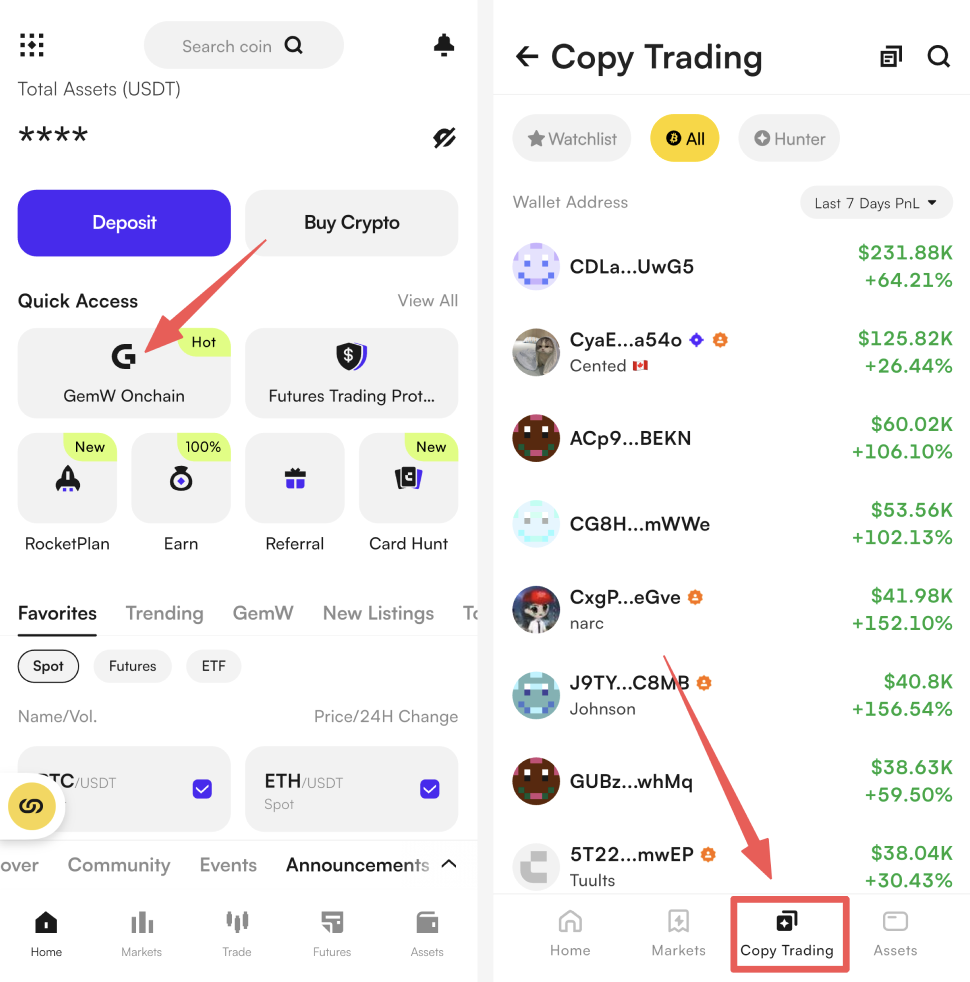
Open the GemW and tap [Copy Trading] in the bottom navigation bar to access the copy trading address list.
Step 2: Select a Copy Trading Address
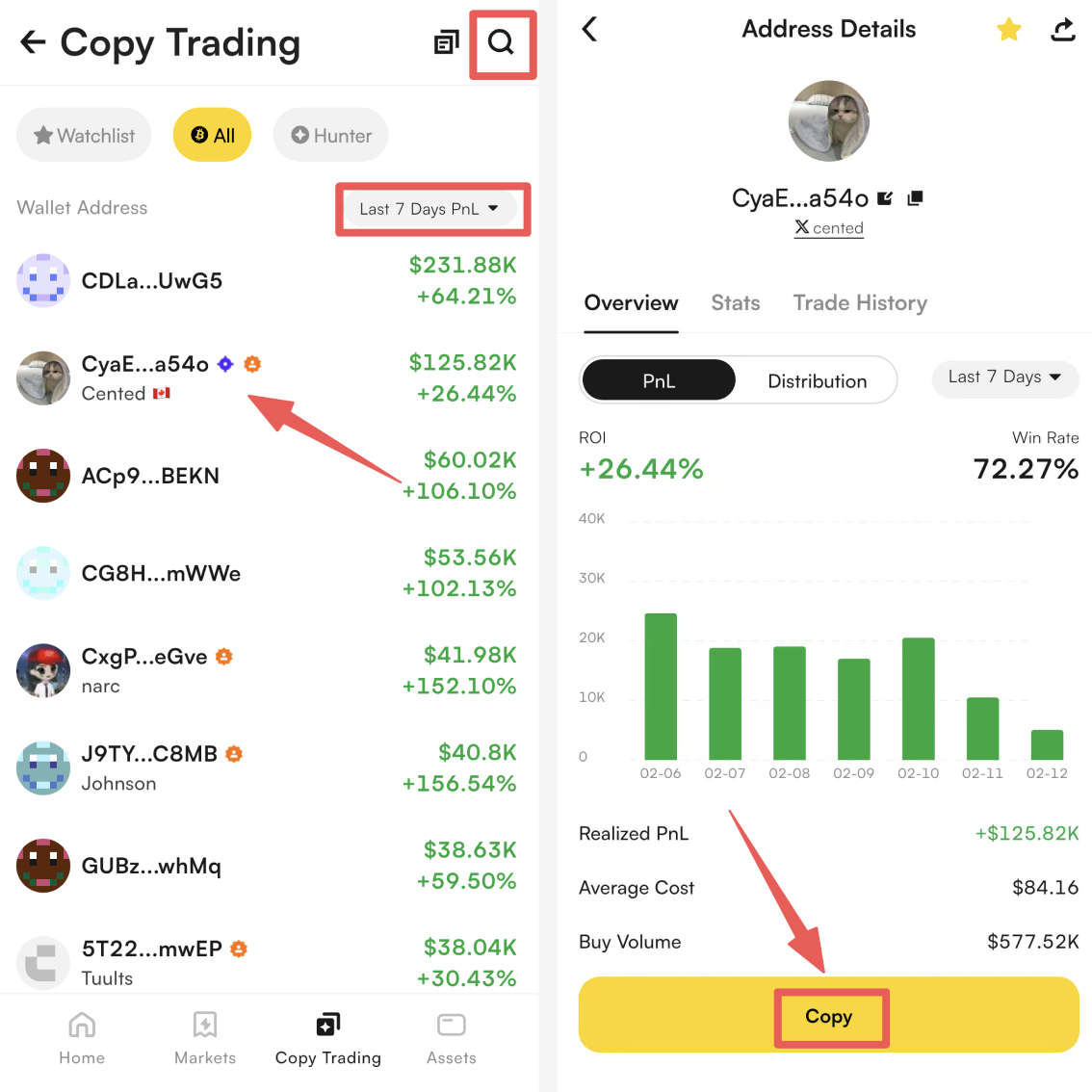
From the address list, select the on-chain address you want to follow. Enter the address detail page and tap the [Copy] button at the bottom.
Ways to find addresses:
Search: Tap the search icon in the top-right corner and enter an address to find supported copy trading addresses
Filter & Sort: Browse and filter addresses by PNL, PNL%, number of trades, and other performance indicators
Step 3: Configure Copy Trading Parameters
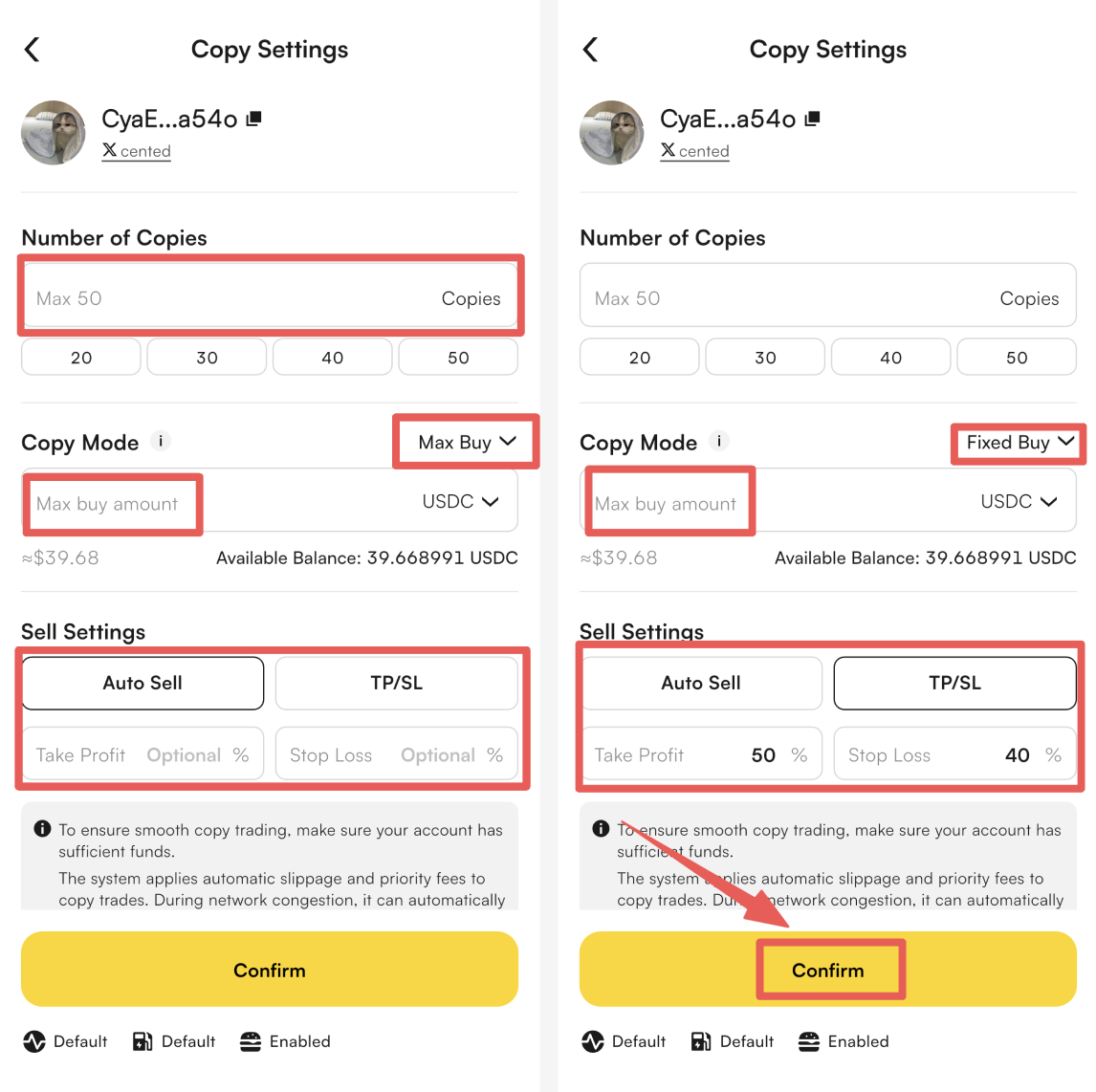
Set the following parameters based on your trading preferences. After confirming all settings, tap [Confirm] to activate copy trading.
Number of Copies
Set how many times the system will automatically follow buy actions from the selected address. Supported range: 1–50 copies.
Copy Mode (Choose one of the following modes)
Max Buy: Each buy follows the actual buy amount of the target address, capped at your preset maximum copy trading amount
Fixed Buy: Each buy uses a fixed amount specified by the user. Minimum buy amount: 5 USDT
Sell Settings (Choose one of the following modes)
Auto Sell: When the copied address executes a sell transaction, the system will sell accordingly. If the target address does not sell, users may still manually sell at any time.
TP/SL: Supports setting take profit and stop loss ratios to manage single-trade risk.
Default take profit ratio: 50%; Default stop loss ratio: 40%
Users may adjust these values according to their trading strategy. When price movements reach the preset thresholds, the system will automatically execute sell orders. Manual selling is also supported during the holding period.
Step 4: Manage or Cancel Copy Trading
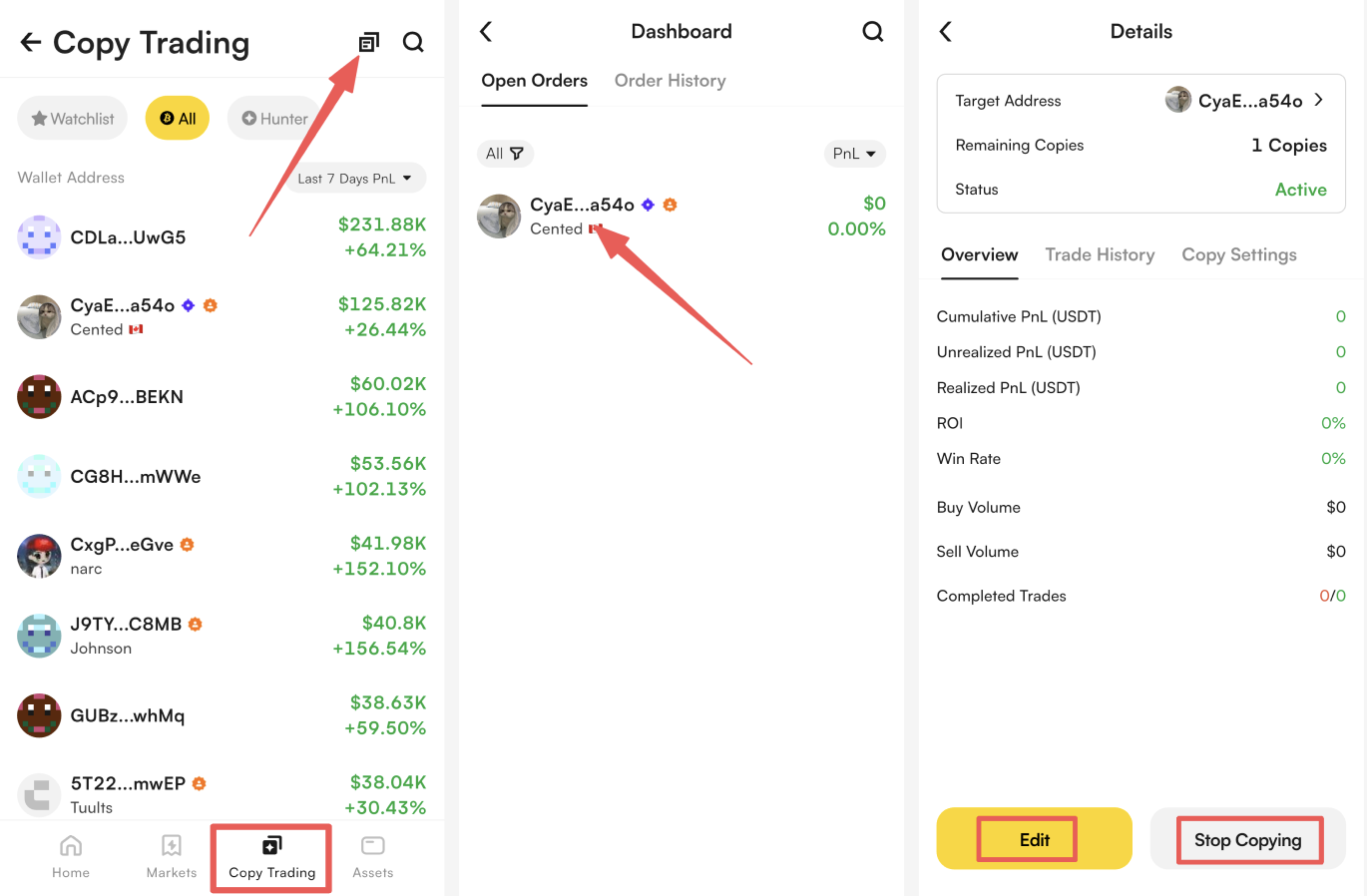
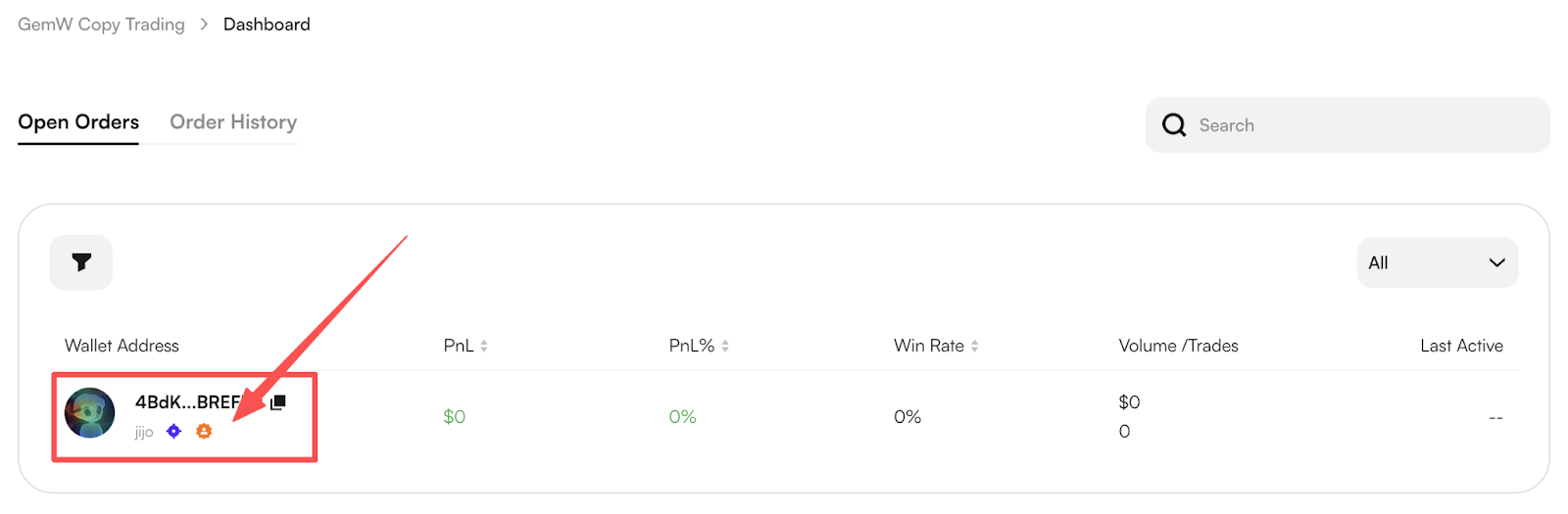
Return to the copy trading address list page and click the icon in the top-right corner to enter [Dashboard]. Select the address you want to manage to view active copy trading records and perform actions.
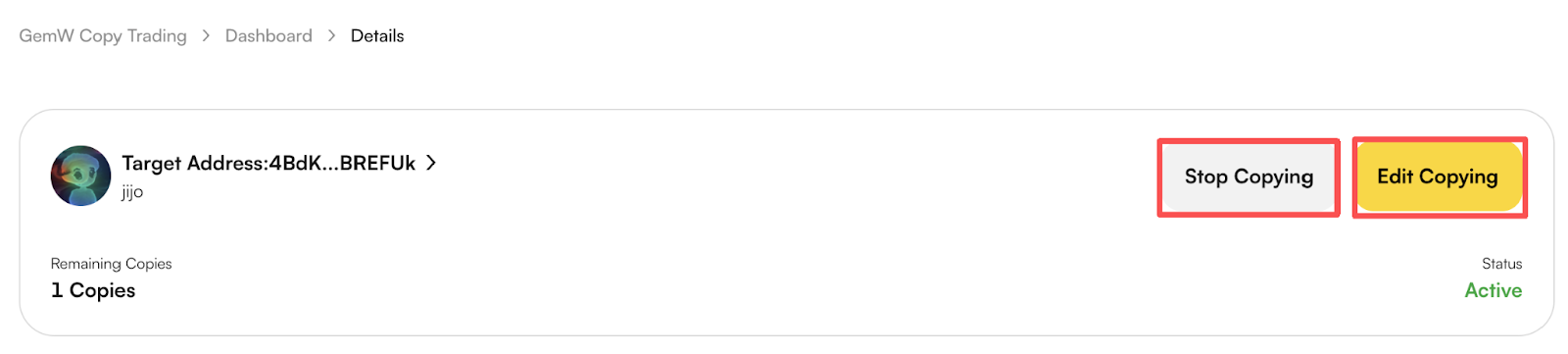
Click [Edit] to modify copy trading parameters
Click [Stop Copying] to terminate the current copy trading setup
Web Copy Trading Guide
Step 1: Access the Copy Trading Page
Open your browser and visit the following link to enter the GemW copy trading page:
https://www.coinw.com/copy-trading/gemw
Step 2: Select a Copy Trading Address
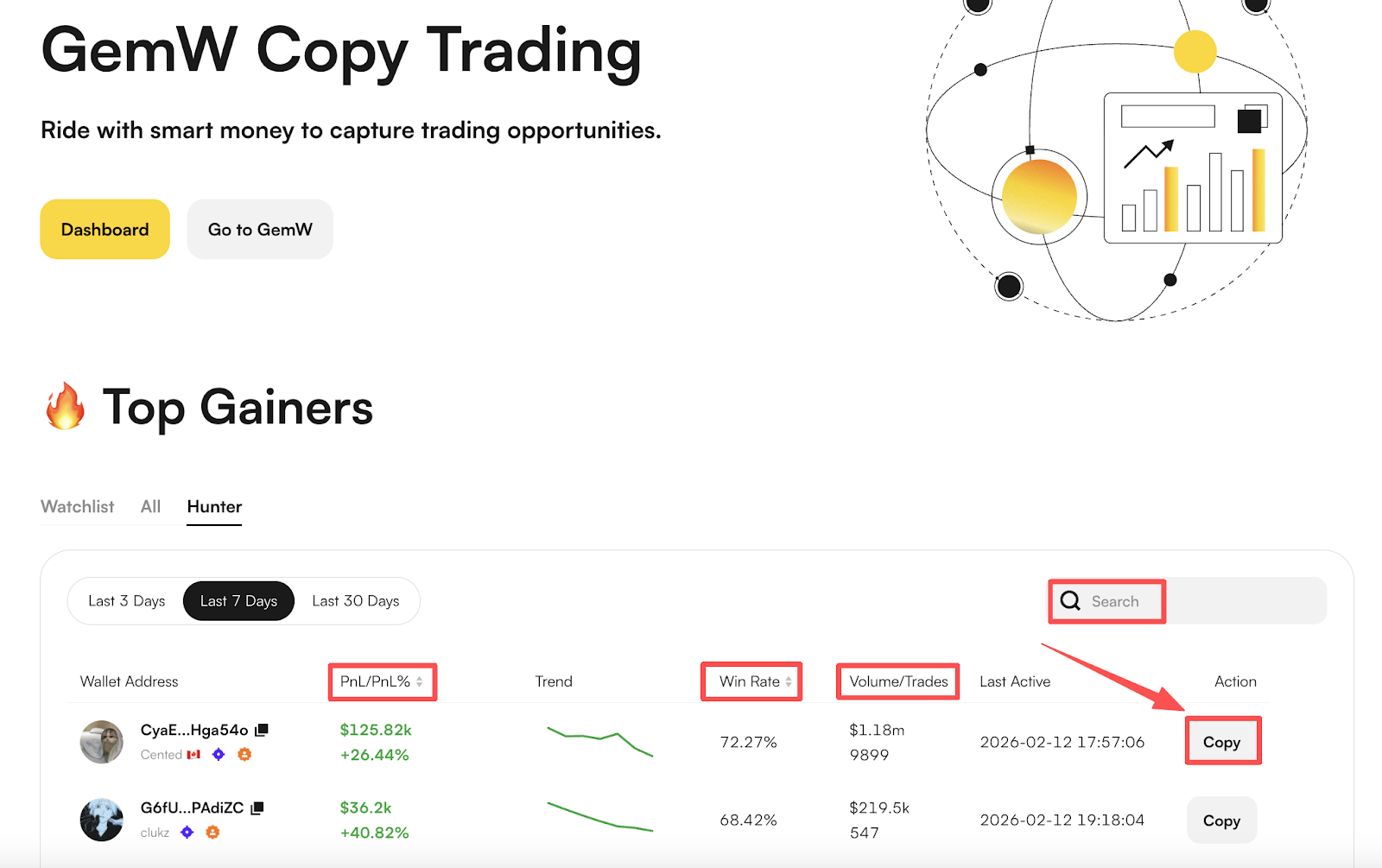
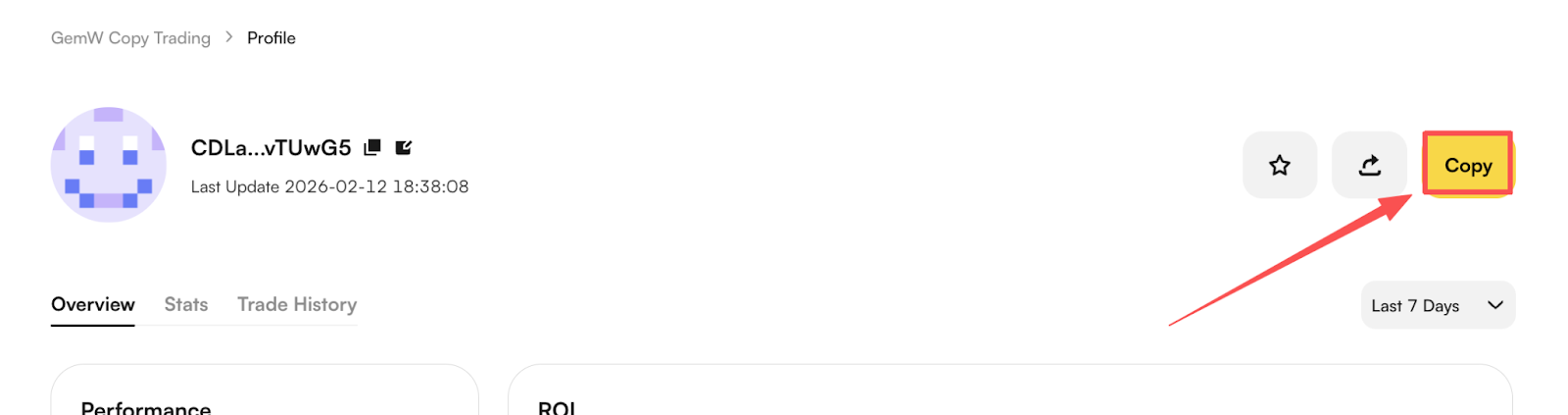
On the copy trading page, select the address you want to follow and click [Copy] to enter the address detail page. Then click [Copy] to proceed to parameter settings.
Ways to find addresses:
Search: Enter an address to quickly find supported copy trading addresses
Sort & Filter: Sort addresses by PNL, PNL%, trades, and other indicators
Step 3: Configure Copy Trading Parameters
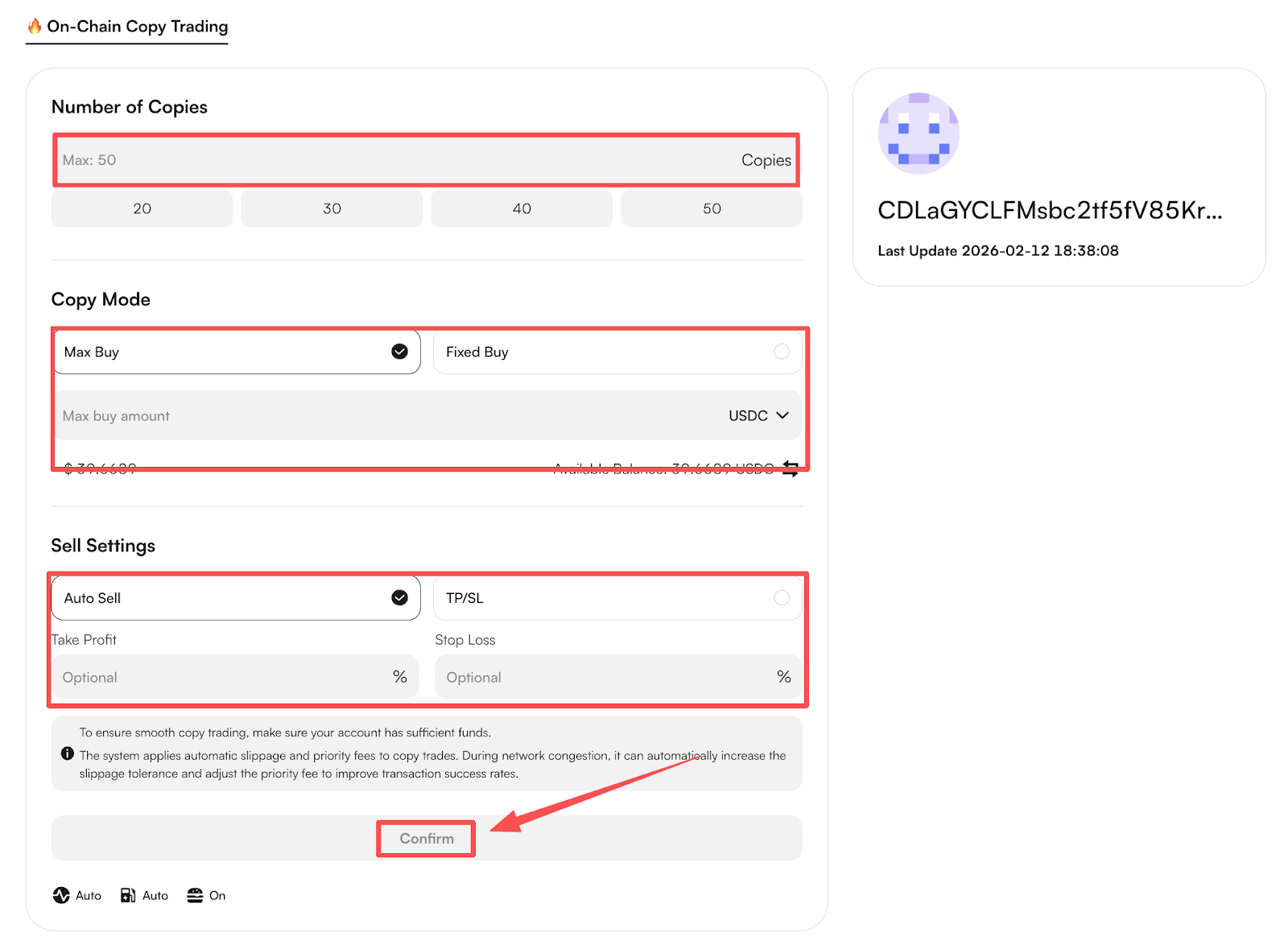
Set the following parameters based on your trading preferences. After confirming all settings, tap [Confirm] to activate copy trading.
Number of Copies
Set how many times the system will automatically follow buy actions from the selected address. Supported range: 1–50 copies.
Copy Mode (Choose one of the following modes)
Max Buy: Each buy follows the actual buy amount of the target address, capped at your preset maximum copy trading amount
Fixed Buy: Each buy uses a fixed amount specified by the user. Minimum buy amount: 5 USDT
Sell Settings (Choose one of the following modes)
Auto Sell: When the copied address executes a sell transaction, the system will sell accordingly. If the target address does not sell, users may still manually sell at any time.
TP/SL: Supports setting take profit and stop loss ratios to manage single-trade risk.
Default take profit ratio: 50%; Default stop loss ratio: 40%
Users may adjust these values according to their trading strategy. When price movements reach the preset thresholds, the system will automatically execute sell orders. Manual selling is also supported during the holding period.
Step 4: Manage or Cancel Copy Trading
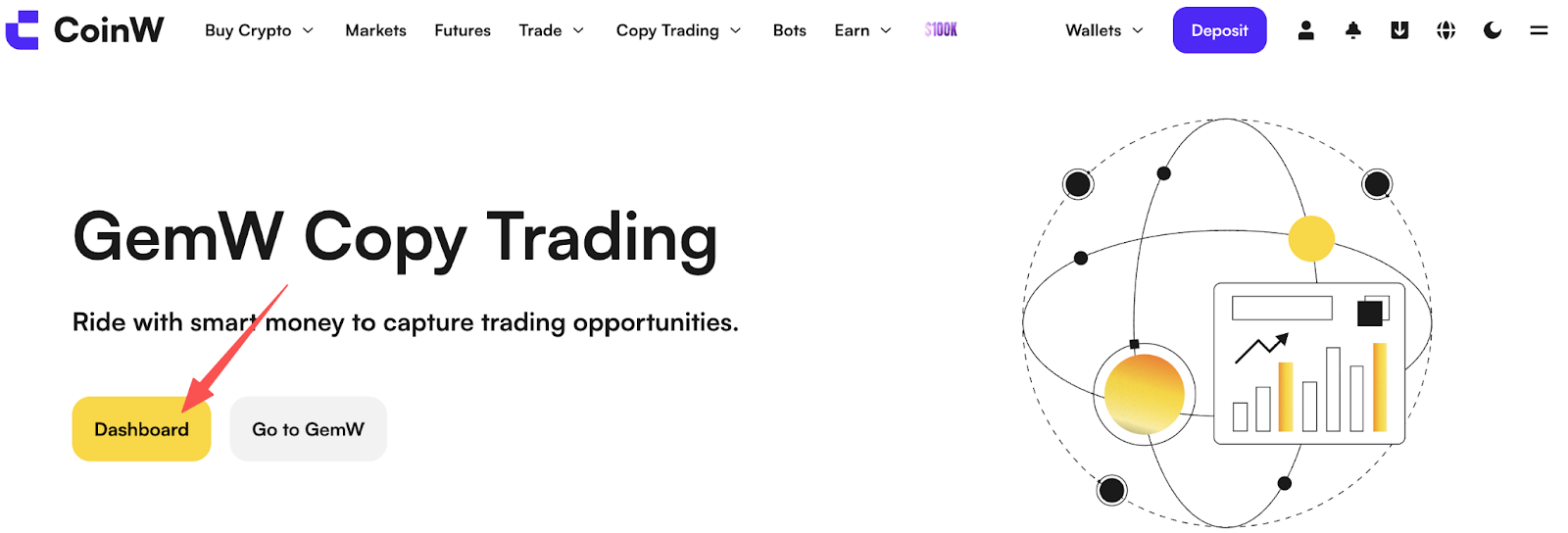
Return to the copy trading address list page and click the icon in the top-right corner to enter [Dashboard]. Select the address you want to manage to view active copy trading records and perform actions.
Click [Edit] to modify copy trading parameters
Click [Stop Copying] to terminate the current copy trading setup
GemW Copy Trading Disclaimer
To protect user rights and ensure risk transparency, please read the following carefully:
Data Accuracy
Copy trading addresses and performance data are displayed based on on-chain public transaction data. Due to blockchain confirmation times, data synchronization delays, or statistical differences, displayed data may be delayed or inaccurate. All information is for reference only and does not constitute investment advice.
Liquidity Risk
Some copy trading addresses may trade low market-cap or low-liquidity tokens. Insufficient liquidity may result in failed copy trades, significant price slippage, or inability to sell positions in a timely manner.
Project Risk
Certain tokens may carry extreme volatility or project risks, including potential rug pulls, which could result in sharp price drops or inability to sell assets. Users are solely responsible for identifying and bearing such risks.
On-chain Execution Risk
All copy trading actions are executed on-chain via smart contracts and are irreversible. Blockchain transactions inherently involve risks such as market volatility, slippage, and network congestion, which may lead to execution results differing from expectations.
Users should fully understand and assess the above risks before enabling copy trading. GemW shall not be held liable for any asset losses resulting from market fluctuations, liquidity issues, project risks, or other uncontrollable factors.
Overview
GemW Copy Trading is an automated on-chain copy trading feature based on blockchain wallet addresses. After users configure their copy trading parameters, smart contracts will automatically execute buy and sell orders by following the selected on-chain address according to the preset strategy.
With GemW Copy Trading, users can easily follow smart money on-chain, capture trading opportunities, reduce operational complexity, and improve trading efficiency.
This guide provides a complete walkthrough of the GemW Copy Trading feature, including how to set up copy trading, manage active copy trades, and cancel copy trading.
App Copy Trading Guide
Step 1: Enter Copy Trading
Open the GemW and tap [Copy Trading] in the bottom navigation bar to access the copy trading address list.
Step 2: Select a Copy Trading Address
From the address list, select the on-chain address you want to follow. Enter the address detail page and tap the [Copy] button at the bottom.
Ways to find addresses:
Search: Tap the search icon in the top-right corner and enter an address to find supported copy trading addresses
Filter & Sort: Browse and filter addresses by PNL, PNL%, number of trades, and other performance indicators
Step 3: Configure Copy Trading Parameters
Set the following parameters based on your trading preferences. After confirming all settings, tap [Confirm] to activate copy trading.
Number of Copies
Set how many times the system will automatically follow buy actions from the selected address. Supported range: 1–50 copies.
Copy Mode (Choose one of the following modes)
Max Buy: Each buy follows the actual buy amount of the target address, capped at your preset maximum copy trading amount
Fixed Buy: Each buy uses a fixed amount specified by the user. Minimum buy amount: 5 USDT
Sell Settings (Choose one of the following modes)
Auto Sell: When the copied address executes a sell transaction, the system will sell accordingly. If the target address does not sell, users may still manually sell at any time.
TP/SL: Supports setting take profit and stop loss ratios to manage single-trade risk.
Default take profit ratio: 50%; Default stop loss ratio: 40%
Users may adjust these values according to their trading strategy. When price movements reach the preset thresholds, the system will automatically execute sell orders. Manual selling is also supported during the holding period.
Step 4: Manage or Cancel Copy Trading
Return to the copy trading address list page and click the icon in the top-right corner to enter [Dashboard]. Select the address you want to manage to view active copy trading records and perform actions.
Click [Edit] to modify copy trading parameters
Click [Stop Copying] to terminate the current copy trading setup
Web Copy Trading Guide
Step 1: Access the Copy Trading Page
Open your browser and visit the following link to enter the GemW copy trading page:
https://www.coinw.com/copy-trading/gemw
Step 2: Select a Copy Trading Address
On the copy trading page, select the address you want to follow and click [Copy] to enter the address detail page. Then click [Copy] to proceed to parameter settings.
Ways to find addresses:
Search: Enter an address to quickly find supported copy trading addresses
Sort & Filter: Sort addresses by PNL, PNL%, trades, and other indicators
Step 3: Configure Copy Trading Parameters
Set the following parameters based on your trading preferences. After confirming all settings, tap [Confirm] to activate copy trading.
Number of Copies
Set how many times the system will automatically follow buy actions from the selected address. Supported range: 1–50 copies.
Copy Mode (Choose one of the following modes)
Max Buy: Each buy follows the actual buy amount of the target address, capped at your preset maximum copy trading amount
Fixed Buy: Each buy uses a fixed amount specified by the user. Minimum buy amount: 5 USDT
Sell Settings (Choose one of the following modes)
Auto Sell: When the copied address executes a sell transaction, the system will sell accordingly. If the target address does not sell, users may still manually sell at any time.
TP/SL: Supports setting take profit and stop loss ratios to manage single-trade risk.
Default take profit ratio: 50%; Default stop loss ratio: 40%
Users may adjust these values according to their trading strategy. When price movements reach the preset thresholds, the system will automatically execute sell orders. Manual selling is also supported during the holding period.
Step 4: Manage or Cancel Copy Trading
Return to the copy trading address list page and click the icon in the top-right corner to enter [Dashboard]. Select the address you want to manage to view active copy trading records and perform actions.
Click [Edit] to modify copy trading parameters
Click [Stop Copying] to terminate the current copy trading setup
GemW Copy Trading Disclaimer
To protect user rights and ensure risk transparency, please read the following carefully:
Data Accuracy
Copy trading addresses and performance data are displayed based on on-chain public transaction data. Due to blockchain confirmation times, data synchronization delays, or statistical differences, displayed data may be delayed or inaccurate. All information is for reference only and does not constitute investment advice.
Liquidity Risk
Some copy trading addresses may trade low market-cap or low-liquidity tokens. Insufficient liquidity may result in failed copy trades, significant price slippage, or inability to sell positions in a timely manner.
Project Risk
Certain tokens may carry extreme volatility or project risks, including potential rug pulls, which could result in sharp price drops or inability to sell assets. Users are solely responsible for identifying and bearing such risks.
On-chain Execution Risk
All copy trading actions are executed on-chain via smart contracts and are irreversible. Blockchain transactions inherently involve risks such as market volatility, slippage, and network congestion, which may lead to execution results differing from expectations.
Users should fully understand and assess the above risks before enabling copy trading. GemW shall not be held liable for any asset losses resulting from market fluctuations, liquidity issues, project risks, or other uncontrollable factors.