Announcement Center
1. Overview: What Is Auto-Earn?
Auto-Earn is a feature from CoinW Earn designed to help you generate passive income from idle assets. Once enabled, the system will automatically subscribe your unused assets in the Earn account, Spot account, Funding account, and Buy Crypto account to corresponding Flexible Earn products daily at 14:00 (UTC), according to your set rules. This allows you to earn continuous yields effortlessly while retaining the flexibility to redeem your assets at any time.
2. Step-by-Step Guide: How to Set Up and Manage
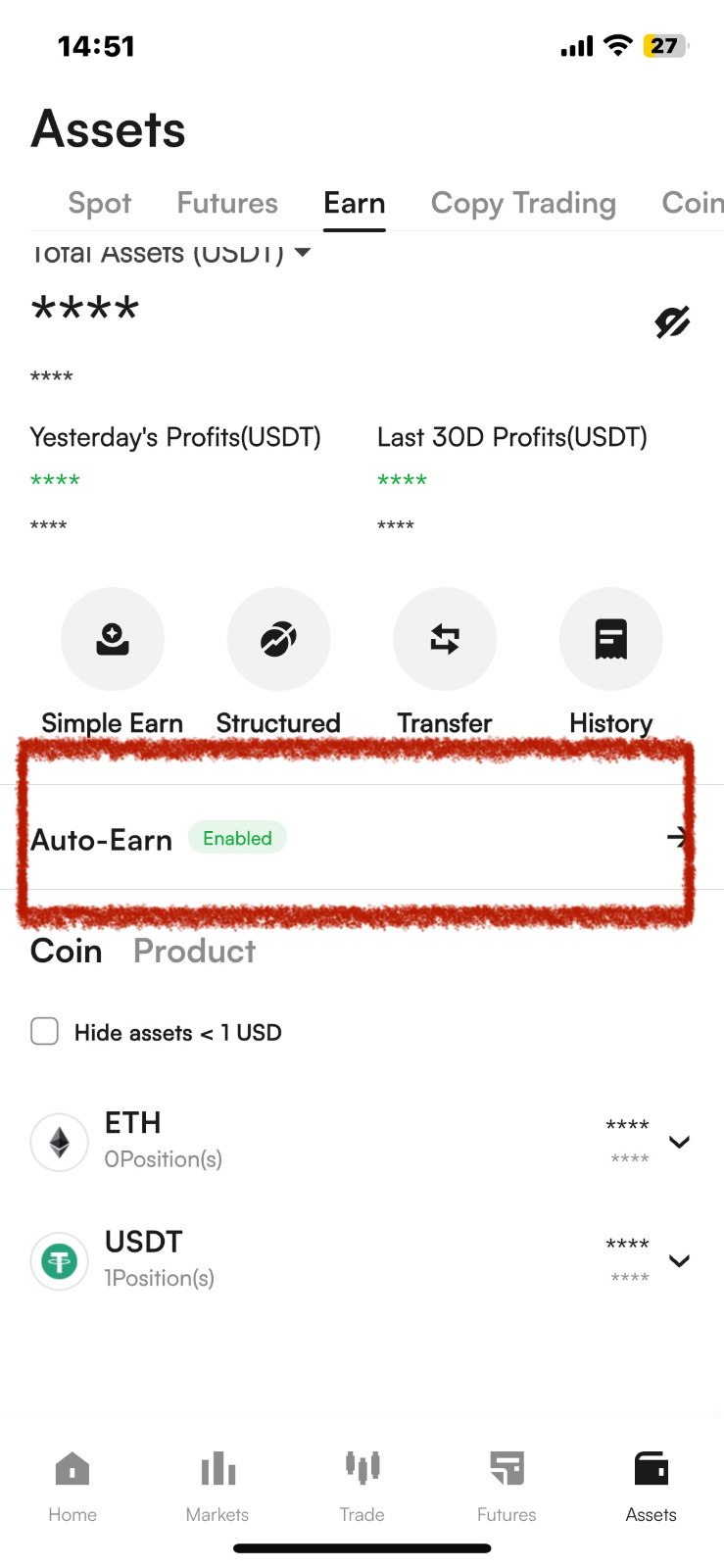
Step 1: Access the Feature Page
In the CoinW App, navigate by tapping the bottom menu: [Assets] > [Earn] > [Auto-Earn] to enter the main feature page.
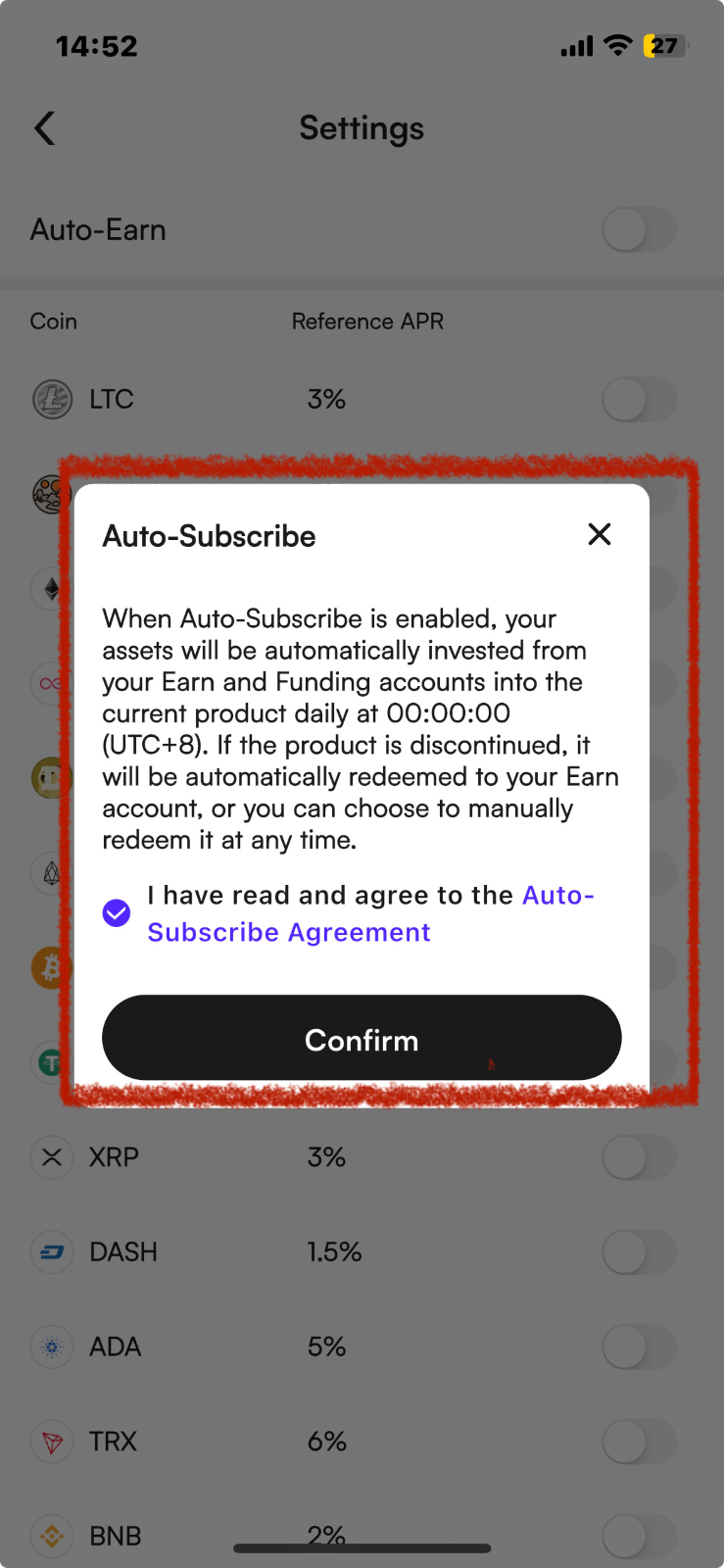
Step 2: Enable/Disable Auto-Earn
On the main "Auto-Earn" page, tap the [Enable] or [Disable] button at the top. Read and check the agreement for the Auto-Subscription Service to toggle the entire feature on or off with one click.
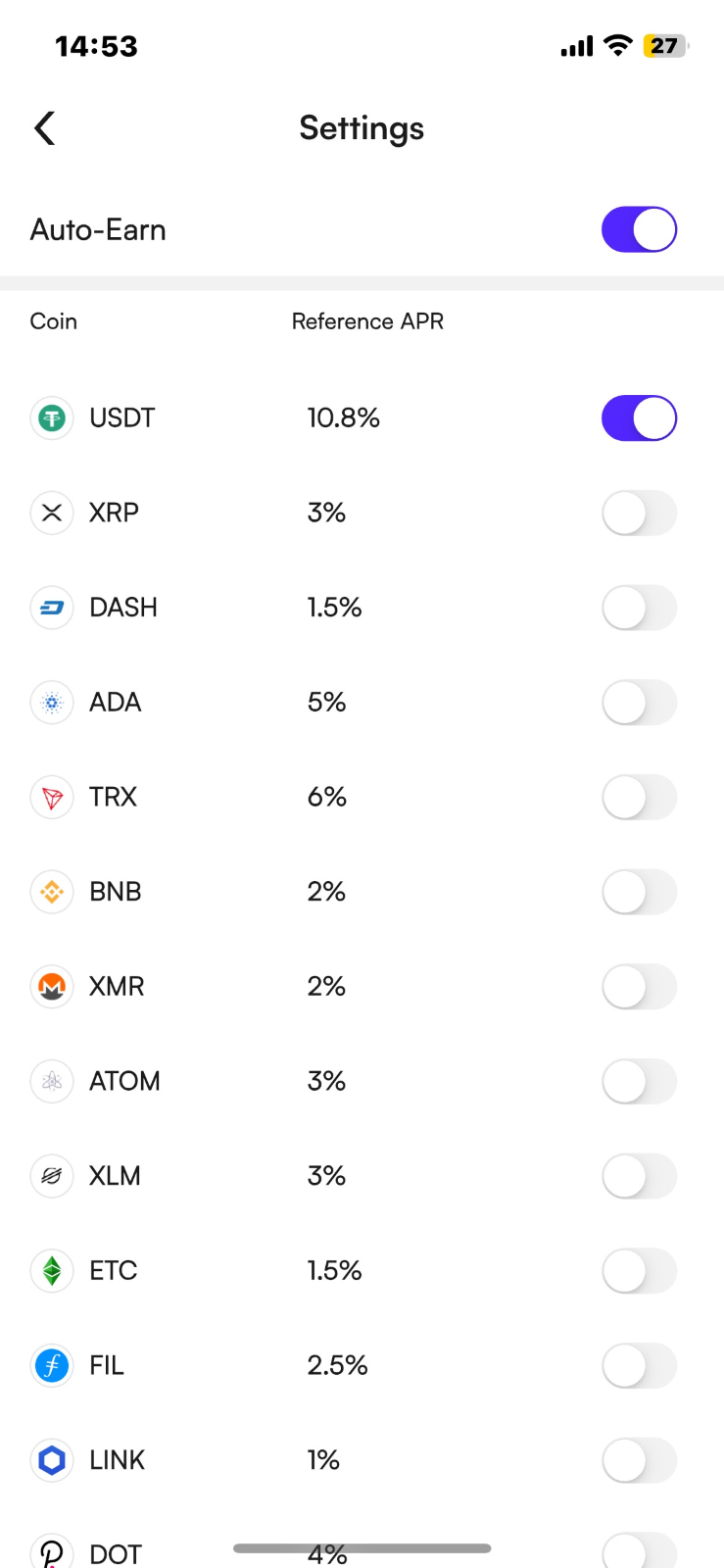
Step 3: Configure Rules for Individual Tokens
Within the [Auto-Earn] settings page, you can configure rules independently for each supported token:
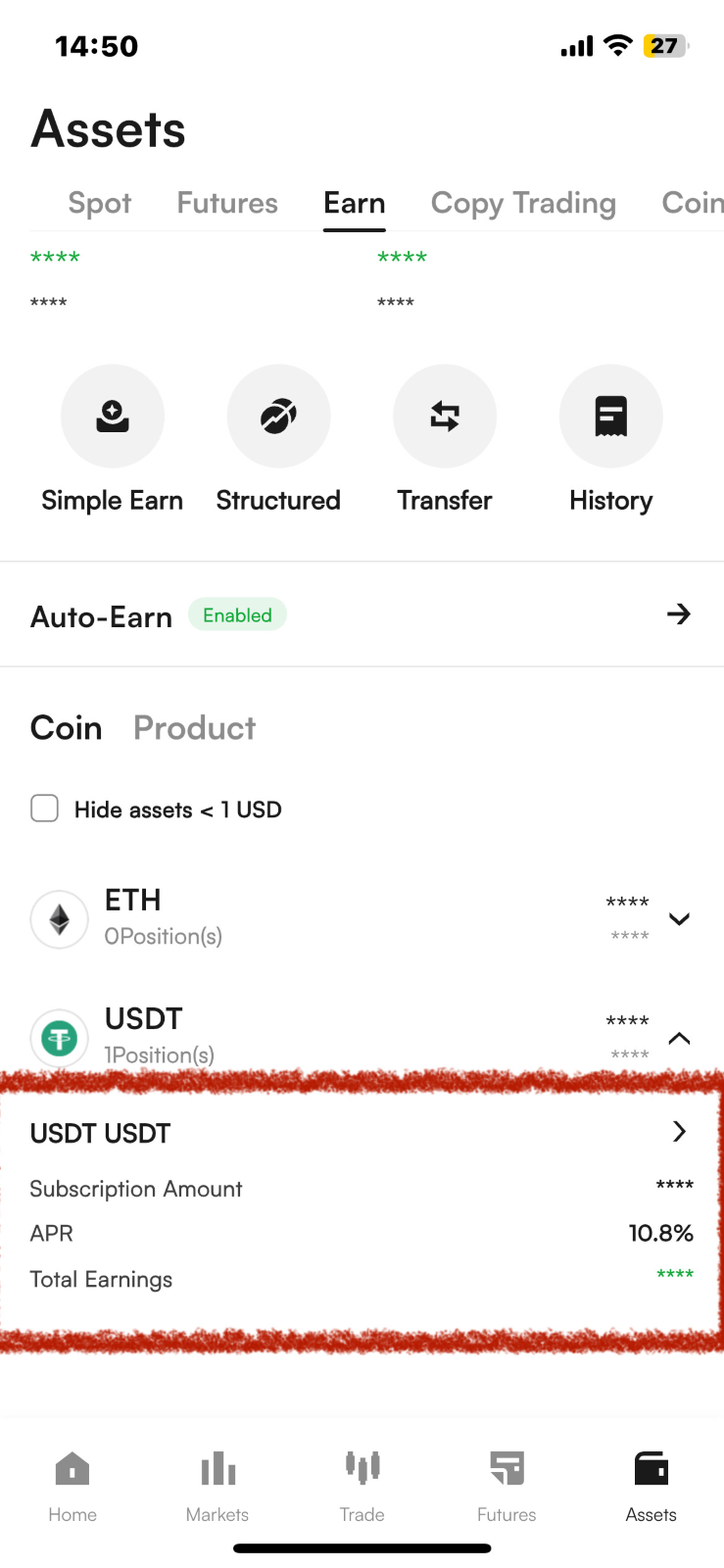
Step 4: Confirm and Review
Once configured, the system will execute automatically according to your rules. You can review all successfully auto-subscribed orders on the main Earn page.
Note: If you need to transfer assets, please redeem them from the order position first. For redemption instructions, please refer to the article: How to Participate in CoinW Earn.
3. Common FAQ
Q1: When does Auto-Earn start generating yields?
A: After a successful auto-subscription, yields will start accruing from D+1 (the day after subscription).
Q2: At what time does the Auto-Earn operation run?
A: The system automatically executes the subscription process daily at 14:00 (UTC).
Q3: What is the subscription threshold for Auto-Earn?
A: The subscription threshold for Auto-Earn aligns with the minimum requirement of the corresponding Flexible Earn product.
4. Supported Tokens
Auto-Earn feature currently supports a variety of mainstream and popular digital assets. You can view the full list within the feature settings page.
5. Important Notes
Flexibility: Funds subscribed through this feature can be redeemed manually at any time. Principal and yields will be returned to your account promptly.
Risk Disclosure: Digital asset prices are volatile. The value of your investment may fluctuate, and you may lose the invested amount. The displayed Annual Percentage Yield (APY) is an estimate of the digital asset rewards you could earn over a selected period. It does not represent actual or predicted returns in any fiat currency. APY is adjusted daily, and estimated earnings may differ from actual yields generated. Please fully understand the associated risks before investing.
Adjustments: You can return to the settings page at any time to modify the reserve amount or toggle individual tokens. All changes take effect immediately.
1. Overview: What Is Auto-Earn?
Auto-Earn is a feature from CoinW Earn designed to help you generate passive income from idle assets. Once enabled, the system will automatically subscribe your unused assets in the Earn account, Spot account, Funding account, and Buy Crypto account to corresponding Flexible Earn products daily at 14:00 (UTC), according to your set rules. This allows you to earn continuous yields effortlessly while retaining the flexibility to redeem your assets at any time.
2. Step-by-Step Guide: How to Set Up and Manage
Step 1: Access the Feature Page
In the CoinW App, navigate by tapping the bottom menu: [Assets] > [Earn] > [Auto-Earn] to enter the main feature page.
Step 2: Enable/Disable Auto-Earn
On the main "Auto-Earn" page, tap the [Enable] or [Disable] button at the top. Read and check the agreement for the Auto-Subscription Service to toggle the entire feature on or off with one click.
Step 3: Configure Rules for Individual Tokens
Within the [Auto-Earn] settings page, you can configure rules independently for each supported token:
Step 4: Confirm and Review
Once configured, the system will execute automatically according to your rules. You can review all successfully auto-subscribed orders on the main Earn page.
Note: If you need to transfer assets, please redeem them from the order position first. For redemption instructions, please refer to the article: How to Participate in CoinW Earn.
3. Common FAQ
Q1: When does Auto-Earn start generating yields?
A: After a successful auto-subscription, yields will start accruing from D+1 (the day after subscription).
Q2: At what time does the Auto-Earn operation run?
A: The system automatically executes the subscription process daily at 14:00 (UTC).
Q3: What is the subscription threshold for Auto-Earn?
A: The subscription threshold for Auto-Earn aligns with the minimum requirement of the corresponding Flexible Earn product.
4. Supported Tokens
Auto-Earn feature currently supports a variety of mainstream and popular digital assets. You can view the full list within the feature settings page.
5. Important Notes
Flexibility: Funds subscribed through this feature can be redeemed manually at any time. Principal and yields will be returned to your account promptly.
Risk Disclosure: Digital asset prices are volatile. The value of your investment may fluctuate, and you may lose the invested amount. The displayed Annual Percentage Yield (APY) is an estimate of the digital asset rewards you could earn over a selected period. It does not represent actual or predicted returns in any fiat currency. APY is adjusted daily, and estimated earnings may differ from actual yields generated. Please fully understand the associated risks before investing.
Adjustments: You can return to the settings page at any time to modify the reserve amount or toggle individual tokens. All changes take effect immediately.